Make Chores Fun: The Kids Chore Chart Canva Template
Let's be honest, getting kids to consistently do their chores can feel like a weekly negotiation. You've tried sticker charts, allowances, and gentle reminders, but the motivation often fizzles out. The problem isn't usually the child; it's the system. A boring, static list doesn't tap into how kids think and respond. They need something visual, interactive, and rewarding. That's exactly the gap the Kids Chore Chart Canva Template 2 is designed to fill. It’s not just a chart; it’s a system built on visual engagement and positive reinforcement, transforming a mundane task into a game they can win.
Anatomy of an Engaging Chore System
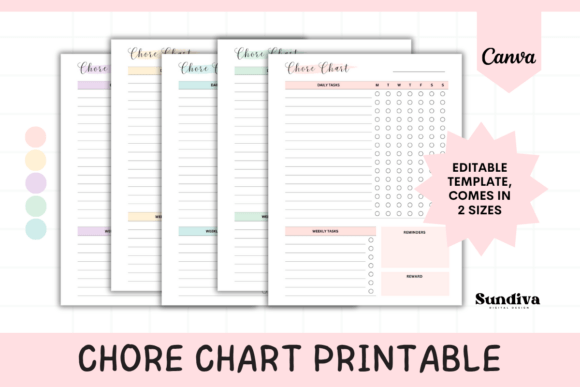
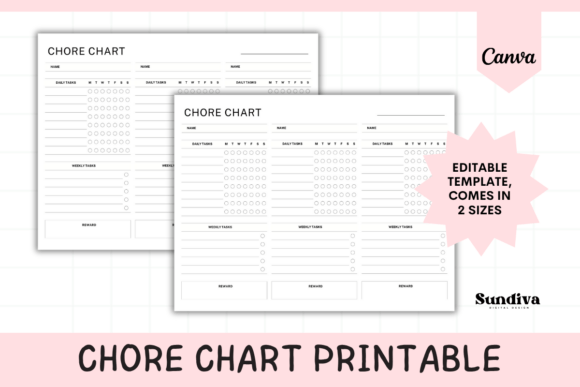
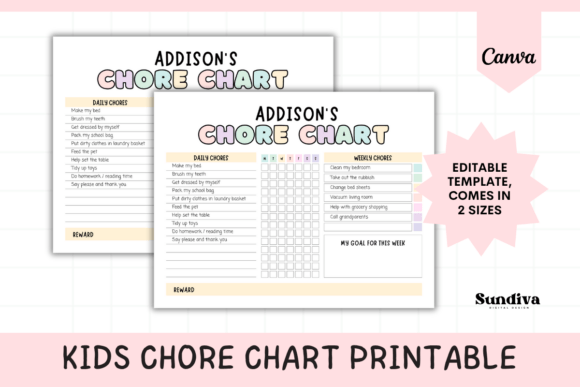
This template moves beyond a simple checklist. Its visual design is intentionally playful and colorful, using clear icons and ample space to make the chart feel approachable, not like a chore itself. The structure is its core strength. It’s divided into logical, child-friendly sections: Daily Chores with a Monday–Sunday grid for simple checkmarks, a dedicated area for Weekly Chores, a motivational “My Goal for This Week” box, and the crucial Reward Box. This layout does more than organize tasks; it teaches time management, goal-setting, and the concept of working toward a payoff. The design personality is energetic and positive, using a modern, clean aesthetic that feels current and engaging for both kids and parents.
Where this template truly shines is in its adaptability. Because it’s a Canva template, you’re not locked into a single style. You can instantly change the color palette to match your child’s bedroom decor or their favorite colors. Swap the fonts to something more playful or more readable based on your child’s age. Edit the text to include specific chores like “Feed the dog” or “Put laundry in the basket.” This level of customization means the chart grows with your family. It becomes a personalized system, not a generic one-off. The included sizes—US Letter and A4—ensure it’s ready for your home printer, making it a practical piece of print design you can implement today.
From Household Tool to Design Asset
For the designers, marketers, and content creators in the audience, the value of a resource like this extends beyond the home. Think of it as a case study in effective visual communication. The Kids Chore Chart Canva Template 2 demonstrates core principles of modern typography and layout: using hierarchy to guide the eye, employing whitespace to reduce clutter, and creating a visual language that resonates with a specific audience. Its strength lies in its clarity and personality—two pillars of strong brand identity.
This template is a prime example of a design asset that solves a real-world problem through thoughtful design. The font choices (which you can alter) typically lean toward a friendly sans serif font for readability, perhaps paired with a script font or handwritten font for headings to inject personality. This kind of font pairing is a fundamental skill in editorial design, packaging design, and social media graphics. Observing how the template balances function and fun is a lesson in audience-centric design. You could even adapt the chart's framework for other projects: a weekly content calendar, a client onboarding checklist, or a personal goal tracker. The editable nature makes it a flexible starting point for various creative and commercial projects.
Integrating the Template into Your Creative Workflow
Adopting this template is straightforward. You receive a PDF with a direct link to the Canva template. To edit, you’ll need a free Canva account. While you can edit on a phone, using a computer is strongly advised for the best experience with detailed designs. Once you open the template, the entire canvas is yours to manipulate. This is where you apply your professional eye.
Evaluate the Fit: Does the existing color scheme work for your child? If not, use Canva’s color picker to create a palette that’s more appealing to them. A child who helped choose the colors is more likely to engage with the chart.
Test Font Pairings: If you want to change the fonts, think about readability first. For younger children, a clear, bold sans serif font is key. For older kids, you might introduce a more sophisticated serif font for headings. Always pair a decorative or display font with a highly readable one for body text to maintain visual hierarchy.
Customize for Clarity: Edit the chore list to be specific and actionable. Instead of “Clean your room,” break it down: “Make your bed,” “Put toys in the bin.” This specificity, a hallmark of good user experience (UX) design, removes ambiguity and sets the child up for success.
Leverage the Reward System: The reward box is a critical component. Use it to reinforce positive behavior. The reward doesn’t have to be monetary; it can be extra screen time, choosing a family movie, or a special outing. This system teaches cause and effect in a tangible way.
The Kids Chore Chart Canva Template 2 is more than a printable; it’s a premium organizational tool that leverages good design principles to change behavior. For parents, it offers a practical, customizable solution to a common challenge. For creative professionals, it’s a creative font and layout case study that demonstrates how thoughtful design can drive engagement and achieve specific goals. It’s a testament to the power of applying professional design assets to everyday life, proving that good design isn’t just for clients—it’s for families too.