Design Professional Pizza Boxes with This Editable Canva Template
When you run a small restaurant, bakery, or catering service, your packaging is often the first physical interaction a customer has with your brand. It’s not just a container for food; it’s a mobile billboard and a tactile representation of your quality. However, commissioning a custom structural design and graphic layout from scratch can be expensive and time-consuming. This is where the Pizza Box Canva Template becomes an indispensable asset for entrepreneurs and designers alike. It bridges the gap between professional packaging design and accessible, DIY customization.
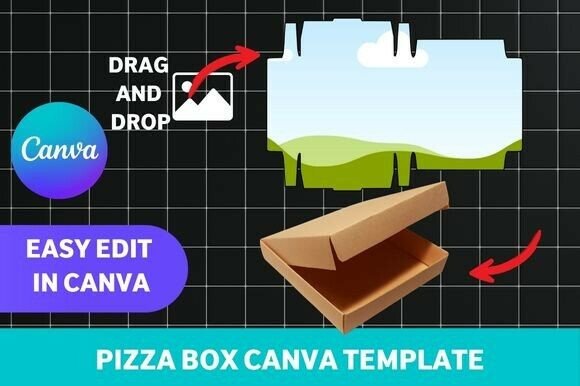
At its core, this template is a pre-structured, high-resolution file designed specifically for the Canva platform. It isn't just a static image; it is a layered, editable design asset that allows you to manipulate every visual element. Whether you are launching a new pizzeria, hosting a large-scale event, or looking to upgrade your bakery’s takeaway service, this template offers a professional foundation. The visual personality of the base design is clean and modern, providing a versatile canvas that can adapt to rustic, minimalist, or vibrant brand identities. It focuses on packaging design fundamentals, ensuring that the structural folds align perfectly with the graphics so your logo doesn't end up in the wrong place when the box is assembled.
Streamlining Your Packaging Design Workflow
The primary appeal of this Pizza Box Canva Template lies in its compatibility with the free version of Canva. You do not need expensive software like Adobe Illustrator or InDesign to create a professional product. This accessibility is vital for small business owners who need to manage their own brand identity without a steep learning curve. The template comes as an instant digital download, meaning you can start working on your design immediately after purchase.
From a design perspective, the template handles the technical heavy lifting. It is print-ready, meaning the file is set up with the correct resolution (usually 300 DPI) and bleed marks required by commercial printers. This eliminates the guesswork that often leads to blurry logos or cut-off text on the final product. The structure of the template guides you through the layout, showing you where the top, sides, and bottom of the box will be. This allows you to focus entirely on the creative aspects—customizing colors, uploading your logo design, and selecting the right typeface for your menu items or tagline.
Visual Hierarchy and Brand Perception
In the realm of packaging design, visual hierarchy is everything. When a delivery driver hands a customer a box, or when someone carries a bag out of your bakery, the design needs to communicate information instantly. A well-designed box guides the eye from the brand name to the logo, and finally to supporting details like social media handles or website URLs. This template is structured to support that flow.
Choosing the right typography is a critical part of this process. While the template provides the structure, you bring the personality through font selection. For a modern, clean look, a sans serif font works well for headers, offering high readability and a contemporary feel. If your brand leans toward tradition or artisanal quality, a serif font can convey a sense of heritage and trust. The template allows you to experiment with font pairing—combining a bold display font for the brand name with a legible sans serif font for the address or phone number. This creates a balanced composition that looks professional rather than cluttered.
Furthermore, the template supports various styles. You can use a script font or handwritten font for a personal touch, perhaps for a "Thank You" message on the inside flap. However, readability must always be prioritized. Since boxes are often viewed from a distance or in dim lighting (like during a movie night), high contrast and clear letter spacing are essential. The template’s layout ensures that even if you choose a decorative creative font, the overall design remains functional.
Practical Applications and Material Considerations
The versatility of this Pizza Box Canva Template extends beyond just pizza. It is an excellent tool for various industries. Bakeries can use it for pastry boxes, utilizing soft pastels and elegant typography to suggest freshness. Event planners can customize it for party favors or "pizza parties," changing the color scheme to match wedding colors or corporate branding. Even content creators and bloggers can use it for unboxing videos or product photography, creating a prop that enhances their visual storytelling.
Once your design is finalized in Canva, the next step is production. The template is designed to be printed on sturdy materials like cardstock or corrugated board. When sending the file to a printer, you have the option to choose finishes that enhance the tactile experience. A matte finish can give a sophisticated, modern look, while a gloss finish can make colors pop and repel grease—a practical consideration for food packaging.
The assembly process is straightforward. The design includes guidelines for cutting and folding, ensuring that the structural integrity of the box remains intact. This is where the print-ready nature of the file shines; it respects the grain of the paper and the mechanics of the box structure, preventing the graphics from looking distorted once folded.
Choosing the Right Design Elements
When customizing your template, think about the modern typography trends that resonate with your target audience. Are you targeting college students with late-night cravings? Bold, high-energy graphics and impactful fonts might work best. Are you a high-end pizzeria focusing on organic ingredients? Minimalist design, ample white space, and a refined typeface will better communicate that value.
Evaluate the included styles within the template. Does it offer enough space for your specific needs? Some businesses have extensive menus or long URLs, so ensuring the layout accommodates this without becoming crowded is crucial. Test your font pairing choices by looking at the design on a screen and, if possible, printing a small test version on standard paper. Check the contrast ratios—light text on a dark background or vice versa—to ensure accessibility for all customers.
Ultimately, this Pizza Box Canva Template is more than just a digital file; it is a tool for business growth. It empowers you to take control of your brand identity and present a polished, cohesive image to the world. By leveraging this editable template, you save on design costs while still achieving a professional result that builds customer trust and recognition. Whether you are a seasoned designer looking for a quick mockup or a small business owner launching your first product, this resource provides the foundation for packaging that stands out.